
Google Gemini Photo Editing Prompts
AI photo editing has evolved far beyond simple filters and auto-enhance buttons. With Google Gemini, you can transform ordinary images into high-impact visuals using natural-language prompts. Whether you’re a creator, blogger, marketer, or photographer, mastering Gemini photo editing prompts can dramatically upgrade your workflow.
In this guide, we’ll explore what makes Gemini powerful, how to write effective prompts, and provide ready-to-use examples for your projects.
What Makes Google Gemini Powerful for Photo Editing?
Google Gemini is designed for multimodal interactions—meaning it can understand and generate text, images, audio, and even video. When applied to photo editing:
- You get precision: Ask for subtle color corrections or major retouches.
- You work faster: One sentence can replace hours of manual editing.
- You focus on creativity: Gemini handles the technical part while you shape the vision.
- You avoid complex software: Perfect for non-designers who still want professional results.
How to Write Great Gemini Photo Editing Prompts
A good prompt typically includes:
1. The Photo’s Subject
Describe what’s in the image (person, product, scenery).
2. The Desired Change
Color adjustment? Retouching? Background swap? Artistic style?
3. The Style or Mood
Bright, cinematic, vintage, dramatic, clean, natural, etc.
4. The Level of Intensity
Subtle, moderate, or strong changes.
5. Additional Details
Lighting, textures, props, facial touch-ups, layout changes.
Example structure:
“Enhance the colors of the sunset, increase contrast slightly, and make the water reflections more vivid while keeping the overall look natural.”
Google Gemini Photo Editing Prompts for Different Uses
Below are curated prompt categories you can copy and use directly with Gemini.
📸 General Photo Enhancement Prompts
- “Brighten the image, improve clarity, and boost color vibrancy while keeping the tones natural.”
- “Reduce noise in low-light areas and enhance the sharpness of the subject.”
- “Adjust white balance to remove yellow tint and give the image a clean, neutral look.”
- “Make the photo high-resolution and improve overall detail.”
👤 Portrait & Selfie Editing Prompts
- “Smooth skin naturally, brighten eyes, and enhance facial symmetry without making it look overly edited.”
- “Remove blemishes and adjust lighting for a soft, warm portrait glow.”
- “Add subtle makeup—light blush, soft eyeliner, and natural lip color.”
- “Create a professional headshot look with clean lighting and a neutral background.”
🌄 Landscape & Travel Photo Prompts
- “Enhance the sky with richer blues and detailed clouds; make the foreground more vibrant.”
- “Increase contrast in the mountains and bring out texture in rocks and trees.”
- “Warm up the lighting to give the photo a golden-hour effect.”
- “Add depth by enhancing shadows and highlights.”
🎨 Creative & Artistic Editing Prompts
- “Convert the image into a watercolor illustration with soft brush strokes.”
- “Apply a cinematic teal-and-orange color grade.”
- “Give the photo a retro film look with grain and faded tones.”
- “Turn the subject into a comic-book style character with bold outlines.”
🛍️ Product Photography Prompts
- “Remove background and replace it with a clean white studio backdrop.”
- “Increase shine and texture to make the product appear more premium.”
- “Add soft shadows under the product for a realistic studio look.”
- “Enhance label readability and improve contrast.”
📱 Social Media–Friendly Editing Prompts
- “Make the image bright, trendy, and Instagram-ready with soft pastel tones.”
- “Add subtle vignette and increase vibrancy for a bold social media look.”
- “Create a minimal aesthetic with muted colors and clean lighting.”
- “Apply a modern influencer style: high exposure, smooth highlights, and low contrast.”
🖼️ Background Removal & Replacement Prompts
- “Remove the current background and replace it with a simple gradient in pastel colors.”
- “Place the subject in a clean studio setting with soft shadows.”
- “Change the background to a city skyline at sunset.”
- “Replace the background with a blurred bokeh effect.”
Tips for Getting Better Results with Gemini Prompts
✔ Be specific: “Add warm lighting” is good; “Add soft warm lighting from the right side” is great.
✔ Use reference styles: Vintage film, cyberpunk, minimalist, cinematic, etc.
✔ Give intensity levels: Subtle, moderate, strong.
✔ Iterate: Run your prompt, see the output, and refine your instructions.
Final Thoughts
Google Gemini makes advanced photo editing accessible to everyone. With the right prompts, you can enhance images, retouch portraits, create artistic transformations, and design social media-ready visuals—all without traditional editing tools.

PROMT – A young Woman with a cheerful expression stands amidst a vibrant, somewhat blurred background that hints at a market or stall selling colorful, fluffy items. She is wearing a white and purple striped short-sleeved top and dark pants. Her most striking accessory is a pair of pastel-colored, fluffy earmuffs with long, floppy extensions that resemble animal ears, draped around her neck and shoulders. She has dark hair, a small nose ring, and is smiling directly at the camera.
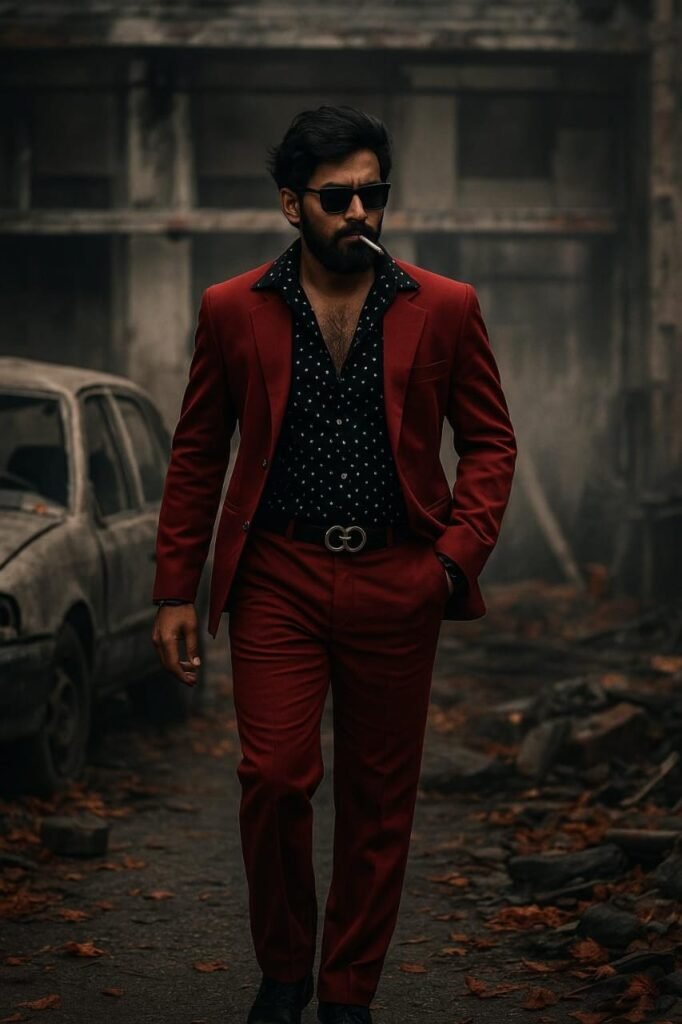
PROMT – A hyper-realistic cinematic digital poster of a powerful South Indian gangster (use uploaded reference photo for face — same nose, same eyes, same cheeks, same eyebrows), walking with dominant swag through a gritty, war-torn street. He wears a bold red suit over a black shirt with white dots, unbuttoned to reveal his chest. His face is framed by a thick beard and voluminous long hair styled backward. He